
Talonarium - Tickets
CampsMediaEvents
0.00.00 Reviews
- Version
- 11.8.1
- Installs
- 100.00K
- Age Rating
- Everyone
Screenshots


Our Review of Talonarium - Tickets
 Analysis by Appyee
Choosing a ticket app is less about having another place to store information and more about avoiding a last-minute scramble at the door. I’d judge any event tool by whether it makes the important details easy to find when plans change, a friend needs a ticket, or the venue is already getting busy. That practical lens matters with Talonarium - Tickets, an events app from CampsMedia whose name and store summary point toward online ticket sales as well as ticket handling.
Where it fits today
The app is free to download, is marked for everyone, and has passed 100K+ installs. Its average rating is currently 0.0, so I wouldn’t treat that figure as a useful verdict on the experience; it offers no positive or negative signal to lean on. I’d approach it as a tool to try for a specific ticketing need, rather than assuming its popularity or rating settles the decision.
For someone organizing a small gathering, a community event, or a recurring activity, the appeal is straightforward: ticket sales can become one more task to manage alongside invitations, attendee questions, and entry. A dedicated event service may keep that work more focused than handling every ticket through messages or spreadsheets. Still, the phrase “without unfair fees” is not a substitute for checking the actual costs involved in a particular sale. Before committing, I’d review the purchase flow and any applicable charges from the perspective of both the organizer and the attendee.
What the version history can—and cannot—tell you
The current version is 11.4.0, following a release on August 3, 2020. That establishes a long-running product with a current version number, but a version number alone doesn’t tell me which features changed, how frequently updates arrived, or whether a particular workflow is better now than it used to be. I wouldn’t read a high version number as proof that every event use case is covered.
For existing users, a newer version can matter if it addresses a workflow they rely on, but the practical test is whether the current app handles their actual event setup reliably. If you already use it, I’d check that your event details, ticket presentation, and any organizer tasks you depend on still fit the way you work before changing your process around it. If you’re new, start with a low-stakes event and confirm the attendee journey end to end before using it for a high-pressure occasion.
A useful organizer workflow
Here’s the everyday situation where I can see a dedicated ticket platform helping: you’re coordinating a neighborhood workshop, several people ask the same questions about attending, and you want to distinguish confirmed guests from those who are still deciding. Rather than keeping a running list in a group chat, you can evaluate whether Talonarium gives you a clear route from publishing the event to managing tickets and welcoming people at the door. The key is to test the whole chain, not just the moment a ticket is created.
A small but useful habit is to run a rehearsal before opening sales. Check the event information as if you were an attendee, then ask someone else to follow the same route on their phone. This catches unclear instructions and confusing steps while there is still time to fix them. It also helps answer a question organizers often have: will a guest understand what to do without asking me for help? That matters more than a polished-looking event page if you’re handling arrivals yourself.
For a shared event, decide in advance who will be responsible for checking tickets and answering attendee questions. Even a straightforward platform can become awkward if one person assumes another is monitoring sales or entry. I’d keep a separate, simple backup record of essential event details and the people responsible for each task; that is a sensible organizer practice, not a claim that the app has a particular backup feature. The trade-off is a little extra preparation in exchange for fewer surprises when several people are involved.
How it compares with familiar alternatives
The usual alternatives are selling or distributing tickets through a large event platform, handling invitations in a messaging group, or managing names manually. Large platforms can be convenient when attendees already know them or when an organizer needs a more established event ecosystem. Group chats are comfortable for informal gatherings, but they can bury essential information under conversation and make it harder to keep a reliable attendee list. A spreadsheet offers control, though it puts more of the organizing burden on you.
Talonarium is worth considering when you want a ticket-focused route and are willing to assess its specific workflow before making it the center of an event. It is not automatically the better option just because it is free to install or because its store summary emphasizes fees. If your event depends on integrations, complex entry operations, or a platform guests already recognize, compare those needs directly before switching. For a casual meet-up with a handful of friends, a group message may be simpler; for a public event, a dedicated service may be more orderly, provided its terms and tools suit the job.
Questions worth settling before a sale
Will guests need to install an app? Is there a straightforward way to explain ticket access to someone who is not comfortable with mobile services? What happens if a buyer needs help or an organizer has to correct an event detail? These are practical questions I’d answer before sharing a ticket page widely. The buyer’s experience is part of the event: unclear access instructions can create extra work for the organizer even when the ticket itself is fine.
I’d also inspect the checkout from the attendee’s point of view before announcing a price. In-app purchases range from $5.99 to $33.99 per item, so I would not assume that every part of using the service is cost-free simply because the download is free. Check what a charge applies to and whether it is relevant to your intended use; don’t make your event budget depend on a guess. The right comparison is the total cost and the friction for your particular event, not a slogan about fees.
Who should give it a closer look
I’d put it on the shortlist for organizers who want to explore a ticket-centered service for a small or medium gathering and are comfortable testing the attendee experience themselves. It may also appeal to someone who regularly coordinates events and would rather assess a dedicated tool than repeat a manual process each time. The most important preparation is to try it with a real but low-risk event, confirm the steps that matter, and make sure your co-organizers know their roles.
I’d be more cautious if you need a specific integration, advanced operational controls, or a support path you can rely on for a time-sensitive event. I’d also skip adopting any new ticket workflow at the last minute: changing how guests receive or present tickets close to the event creates avoidable uncertainty. The minimum operating system is Android 7.0, which is useful to check if you plan to involve attendees with older devices. If a key guest cannot comfortably use the process, provide a clear alternative that you have actually tested.
What I’d watch next
The useful signals for an event app are not just a version number or a promise about charges. I’d look for clear explanations of organizer costs, a smooth path for attendees, and practical help when something goes wrong. For a product that has been around since 2020, current documentation and a dependable way to resolve event-day questions would also make a difference to my confidence. Those are areas to verify as you decide, rather than benefits I’d assume in advance.
My bottom line is cautious but open-minded: Talonarium may be a sensible fit if its actual ticket-selling process matches your event and the full costs work for you. Treat the first event as a trial, inspect the attendee journey, and keep a simple contingency plan. If that test feels clear to both you and your guests, it can earn a place in your organizing routine; if it creates extra steps or leaves important questions unanswered, a familiar platform or a simple manual approach may serve you better.
Simplifying Ticket Management
First things first, downloading Talonarium - Tickets was a breeze. Available on both Android and iOS, I found it easily on the app store. Once installed, the user interface immediately caught my eye. It's clean, intuitive, and doesn’t overwhelm you with too many options. A big thumbs up for that!
Adding and Organizing Tickets
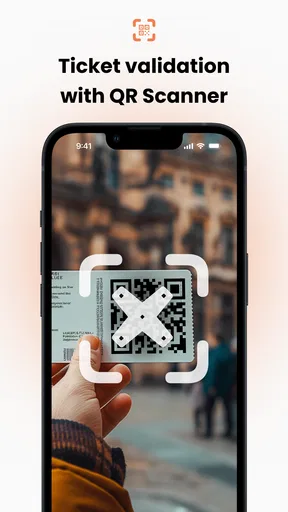
Adding tickets is as simple as pie. You can either scan the QR code or manually enter the details. The app supports a wide variety of events, from concerts and sports to theater shows. What I loved was the ability to categorize tickets based on events, dates, or even custom tags. This makes finding a specific ticket quick and painless.
One of the standout features is the calendar integration. By syncing with your calendar, Talonarium ensures you don’t miss any upcoming events. It sends timely reminders, which is perfect for someone like me who tends to forget things.
Sharing and Transferring Tickets
Sharing tickets with friends or family is another area where this app excels. You can easily transfer tickets to someone else with just a few taps. I tested this feature by sending a couple of concert tickets to a friend, and it worked flawlessly. The recipient received a notification and could access the ticket immediately.
Security and Privacy
Now, I know what you might be thinking – what about security? Rest assured, Talonarium - Tickets takes security seriously. It uses encryption to protect your data and offers secure cloud storage. Plus, the app doesn’t bombard you with ads, which is a relief in today’s app world.
User Experience and Performance
In terms of performance, the app is smooth and fast. I didn’t encounter any lags or crashes during my use, which is always a good sign. The developers seem to have put a lot of thought into the user experience, making the app both functional and enjoyable to use.
Room for Improvement
While I’m quite impressed with the app, there’s always room for improvement. For instance, a feature to integrate with more event platforms would be a welcome addition. Also, a dark mode option would be nice for those late-night event browsing sessions.
Another point to consider is customer support. Although the app is pretty straightforward, having a responsive support team can make a difference if you run into any issues. It would be great to see more options for user support within the app itself.
Final Thoughts
Overall, Talonarium - Tickets is a fantastic app for anyone who frequently attends events. It makes managing tickets easy and stress-free, which is exactly what we need in this fast-paced world. If you're someone who loves attending events but dislikes the hassle of keeping track of tickets, this app might just be your new best friend.
So, if you're ready to streamline your ticket management, give Talonarium - Tickets a try. It's time to say goodbye to paper tickets and hello to a more organized event experience!
Verdict
Strengths of Talonarium - Tickets
- User-friendly interface for easy navigation.
- Quick ticket booking and confirmation.
- Secure payment options available.
- Integration with popular event platforms.
- Customizable notifications for events.
Limitations of Talonarium - Tickets
- Limited event categories to choose from.
- Occasional app crashes reported by users.
- Requires stable internet for optimal use.
- No offline ticket viewing option.
- Limited language support for non-English users.
Similar Picks in This Category
View All
Easy Quran Mp3 Audio Offline
Muslim Worldapp4.7

Invitation Maker: Cards & RSVP
Greetings Island4.9

StubHub - Live Event Tickets
StubHub4.3

Fever: Events & Tickets
Fever Labs4.7

Epic Freebie Games Radar
Arioch Pds - Apps & Games4.4

Invitation card Maker, Design
Splendid App Maker4.9
Frequently Asked Questions
What features does Talonarium - Tickets offer to users?
Talonarium - Tickets provides a seamless experience for purchasing and managing event tickets. Users can browse events, buy tickets, and receive instant confirmations. The app also offers a digital wallet feature to store tickets securely and provides event reminders. Additionally, users can easily share tickets with friends or family directly through the app.
Is Talonarium - Tickets available for both Android and iOS devices?
Yes, Talonarium - Tickets is available for download on both Android and iOS platforms. The app ensures a consistent user experience across devices, allowing users to access their tickets and event information seamlessly, whether they switch between an Android phone and an iOS tablet.
How secure is the payment process on Talonarium - Tickets?
Talonarium - Tickets employs advanced security measures to protect users' financial information. The app uses encryption protocols to ensure that all transactions are secure and private. Additionally, it supports various trusted payment methods, offering users peace of mind when purchasing tickets online.
Can I get a refund if I can’t attend an event?
The refund policy on Talonarium - Tickets depends on the event organizer's terms and conditions. Users should check the specific event details to understand refund eligibility. Generally, refunds may be available if requests are made within a specified period before the event date, but this can vary.
Does Talonarium - Tickets offer customer support for users?
Yes, Talonarium - Tickets provides dedicated customer support to assist users with any issues or questions. Users can contact support via in-app chat, email, or phone. The support team is committed to resolving queries quickly to ensure a smooth experience for all users.
